
Gemini Chat Exporter
Problem Statement
Google Gemini has no export button. You can't save your conversations to use in other tools, reference later, or share with teammates. For anyone building with AI, losing conversation history means losing context.
The Hard Part
Building a chat exporter sounds simple. It wasn't. Gemini uses lazy loading inside a custom <infinite-scroller> element. Only the messages visible on screen exist in the DOM. The rest don't load until you scroll to them.
- Custom elements, not divs — conversations live inside
<user-query>and<model-response>custom elements, not standard HTML - Scroll-triggered loading — setting
scrollTop = 0loads older messages above the current ones, then Gemini adjustsscrollTopback to keep your viewport in place - Repeated hammering required — you have to keep forcing
scrollTop = 0with pauses until no new content appears. First scroll: 10 messages. After repeated scrolling: 34 (the full chat) - Hidden screen-reader spans — Gemini injects
<span class="screen-reader-only">You said</span>text that pollutes exports if not filtered
Solution
Gemini Chat Exporter is a Chrome extension that reverse-engineers Gemini's DOM to capture complete conversations:
- Full history capture — auto-scrolls the infinite scroller to load every message before export. No truncated chats
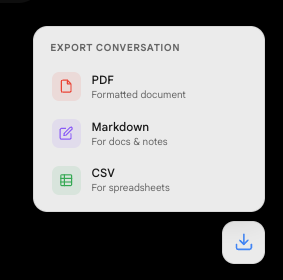
- Three export formats — PDF (formatted with headers and styling), Markdown (clean and portable), CSV (structured for analysis)
- Clean output — strips screen-reader artifacts, normalizes whitespace, preserves code blocks and formatting
- One-click export — popup UI with format selection. Click and download
Screenshots
Key Product Decisions
- Reverse-engineer, don't scrape. Generic DOM scrapers fail on Gemini's custom elements. Understanding the actual component structure was the only path to reliable extraction
- Scroll-then-capture pipeline. Load all content first, then parse. Trying to parse while scrolling introduces race conditions and incomplete captures
- Three formats for three use cases. PDF for sharing, Markdown for knowledge bases, CSV for analysis. Each format is purpose-built, not a generic dump
- No permissions beyond activeTab. The extension only activates on gemini.google.com. No background processes, no data collection
Impact & Metrics
3 Formats
PDF, Markdown, and CSV export
100%
Full chat capture via reverse-engineered scroll
Open Source
Lessons Learned
- Modern web apps are hostile to extensions. Custom elements, shadow DOM, lazy loading, dynamic class names. Building reliable extensions for apps like Gemini requires actual reverse engineering, not just querySelector
- The scroll problem is the whole problem. 90% of the engineering effort went into reliably loading all messages. The actual export logic was trivial by comparison
- AI agents can scaffold fast, but edge cases are manual. The initial 4-agent build took 90 seconds. Fixing the lazy-loading capture took hours of manual DOM investigation